Pog Luck: A Gaming-Style Color Font for Web Design
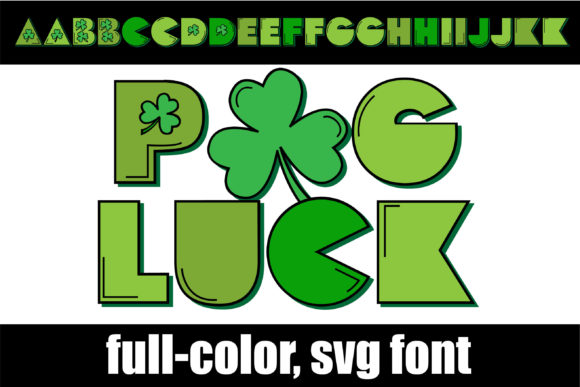
Pog Luck is a distinctive addition to the growing library of Color Fonts, offering web designers and digital creators a tool that merges playful aesthetics with modern typographic technology. As a specialized typeface, this font brings gaming-style lettering complete with highlights, shadows, and shamrocks directly into your browser-based layouts. Unlike traditional monochrome typefaces, Pog Luck utilizes OpenType full-color SVG technology, allowing it to render complex visual details without requiring multiple image layers or heavy CSS workarounds. For UI designers building immersive landing pages or online stores, this means you can achieve a high-impact visual identity with minimal code overhead.
Integrating Pog Luck into Hero Sections and Landing Pages
When designing hero sections for gaming platforms, esports tournaments, or lifestyle brands targeting a younger demographic, visual hierarchy is critical. Pog Luck serves as an excellent primary display font because its inherent shadows and highlights create immediate depth. In a flat design environment, adding a Color Font like this breaks the monotony and draws the eye instantly to the main value proposition. Because this font includes built-in shading, you do not need to apply text-shadow CSS properties that might blur on certain screens or fail to render consistently across different browsers. The result is a crisp, vibrant headline that maintains its integrity whether viewed on a high-resolution desktop monitor or a mobile device.
For landing pages focused on conversion, the tone set by your typography can significantly influence user trust and engagement. Pog Luck’s gaming-style lettering suggests energy, fun, and modernity. If you are launching a new app, a digital course on game development, or a boutique store selling streetwear, using this font in your H1 tags signals that your brand is current and dynamic. However, readability remains paramount. While Pog Luck is highly decorative, it works best for short, punchy headlines rather than long paragraphs. Use it to anchor the top of your page, then transition to a clean sans serif font for body copy to ensure users can scan information quickly without visual fatigue.
Enhancing Brand Identity with Shamrock Accents and Highlights
Brand consistency across digital touchpoints is easier to maintain when your typography carries unique character elements. Pog Luck distinguishes itself with integrated shamrocks and stylized highlights, which can serve as subtle brand markers without cluttering your layout with additional graphic assets. For web designers creating brand kits, this means fewer SVG icons to manage and faster load times. When you use this Color Font in logos or badge designs for your website, the color data is embedded within the font file itself. This ensures that every time the font loads, the colors appear exactly as intended, preserving the integrity of your visual identity across different devices and operating systems.
Consider using Pog Luck for promotional banners during seasonal campaigns or special events. The playful nature of the lettering makes it ideal for limited-time offers, flash sales, or community challenges. Because the font supports full-color SVG, you can place it over various background colors or images, and it will retain its vibrancy. This flexibility is crucial for responsive web design, where headers must adapt to different screen sizes and background contexts. By leveraging the built-in visual effects of Pog Luck, you reduce the need for complex image editing, streamlining your workflow from design to deployment.
Technical Implementation and Browser Compatibility for Color Fonts
One of the most significant advantages of modern Color Fonts is their ease of installation and use. Pog Luck follows the standard OpenType specification, meaning it is installed like any normal .otf font. This usually happens via standard font management tools on your operating system, making it accessible for both design software and web development environments. For web designers, this simplifies the integration process. You do not need specialized plugins or unconventional coding practices to get started. Once installed, you can call the font in your CSS just as you would any other web font, ensuring a smooth transition from mockup to live site.
However, it is essential to understand the technical nuances of SVG fonts in web design. While support for OpenType-SVG fonts has grown significantly across major browsers, always test your layouts on target devices to ensure consistent rendering. For fallback scenarios, consider pairing Pog Luck with a robust system font stack. This ensures that if a browser does not fully support the color features, the text remains legible and structurally sound. Additionally, check the licensing terms for commercial use. If you are building client websites or selling digital templates, verify that your license covers web embedding and commercial projects. Proper licensing protects both you and your clients, ensuring that your use of premium assets like Pog Luck is legally sound and professionally managed.
Pairing Strategies for Readability and Visual Balance
To maximize the impact of Pog Luck, strategic font pairing is necessary. Since this font is heavily decorated with highlights and shadows, it demands simplicity from its counterparts. Pair it with a neutral, geometric sans serif font for body text and navigation menus. This contrast creates a clear visual hierarchy, guiding the user’s eye from the engaging headline to the actionable content. Avoid pairing it with other decorative or script fonts, as this can create visual noise and reduce overall readability. The goal is to let Pog Luck shine as the focal point while supporting elements recede into the background.
In mobile-first design, consider scaling down the size of Pog Luck or using it sparingly. On smaller screens, intricate details like shamrocks and highlights may become less distinct. Test your headings at various breakpoints to ensure they remain legible and impactful. For button text or small UI elements, stick to simpler typography to maintain usability. By balancing the expressive nature of Pog Luck with functional, clean typefaces, you create a digital experience that is both visually striking and easy to navigate. This approach not only enhances aesthetic appeal but also supports better user engagement and higher conversion rates for your web projects.