Gameblink: A Futuristic Display Font for Makers
I was sitting at my desk late last night, trying to finalize the label design for a new batch of neon-colored soy candles. The packaging needed something that felt electric and modern, yet clean enough to remain legible on a small jar. I had scrolled through dozens of Display Fonts, but nothing quite captured that "gamer-chic" vibe I wanted until I opened Gameblink. It started as a simple test in my design software, but once I activated the ligature characters, the entire mood of the project shifted instantly.
Gameblink for Modern Product Labels and Packaging Design
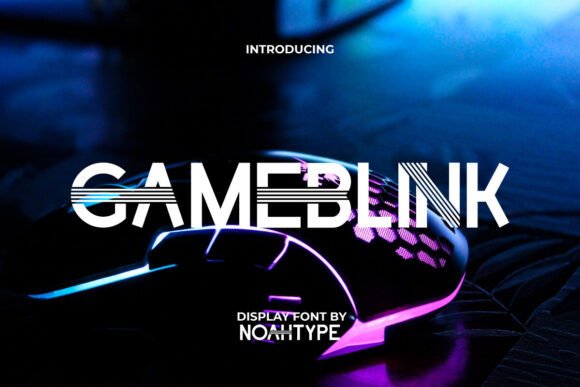
When you first load Gameblink into your workspace, it might appear deceptively simple, resembling a standard modern sans-serif typeface. However, the true magic of this Display font reveals itself when you begin typing out product names or brand slogans. As a creator who relies heavily on physical labels for my shop, I found that Gameblink offers a unique balance between futuristic edge and professional readability. I tested it on a mockup for a limited-edition candle line, and the result was immediately striking.
The characters are crisp and bold, making them perfect for packaging design where visibility is key. Unlike many decorative fonts that become messy when scaled down, Gameblink maintains its structural integrity even on smaller sticker labels. The real game-changer, however, is the inclusion of special ligatures. By simply including specific character combinations, the font transforms, adding those cool, tech-inspired details that make a product stand out on a crowded shelf. This feature allows me to create a distinct brand identity without needing to manually edit vector paths or struggle with complex kerning adjustments.
Gameblink Ligatures for Stickers and Merchandise Graphics
One of the most exciting aspects of working with Gameblink is how the ligature system breathes life into static text. For my recent sticker sheet collection, I used these special characters to add subtle futuristic accents to words like "Power," "Level," and "Start." The effect is subtle but impactful; from a distance, the text looks clean and modern, but up close, the customer notices the intricate details that signal high-quality craftsmanship.
If you are creating merchandise like tote bags, mugs, or t-shirts, Gameblink serves as an excellent centerpiece for short phrases and titles. The font's geometric nature pairs beautifully with digital printing methods, ensuring that the lines remain sharp and the colors stay vibrant. I found that the ligatures work particularly well for creating logo-like elements within a sentence, allowing you to highlight specific keywords on your product tags or hangtags. This capability turns a simple text-based design into a memorable visual asset that customers want to wear or display.
Gameblink for Digital Downloads and Printable Wall Art
Beyond physical goods, Gameblink has proven to be a versatile tool for digital creators selling printables. I recently designed a series of motivational wall art prints targeting home offices and gaming setups. Using Gameblink allowed me to capture that sleek, high-tech aesthetic that resonates with this specific audience. The font's modern typography fits perfectly into contemporary interior design trends, bridging the gap between playful gaming culture and sophisticated home decor.
For digital downloads, the clarity of the font is essential. When customers print these files at home or send them to a local print shop, they expect the text to look as good on paper as it did on their screen. Gameblink delivers on this promise. Whether you are designing planner pages, invitation templates, or social media graphics, the font scales beautifully. The clean lines ensure that the text remains readable even when printed on matte or glossy paper, avoiding the blurring issues often associated with overly thin or ornate scripts.
Gameblink Typography for Invitations and Event Branding
While Gameblink is rooted in a futuristic style, its versatility extends to event branding and invitations, especially for themed parties, tech conferences, or modern weddings with a non-traditional twist. I tested the font on a wedding welcome sign mockup for a couple who wanted a "cyberpunk" theme. The result was stunning; the font provided just enough structure to keep the event details clear while delivering the edgy, cool factor they were looking for.
When using Gameblink for invitations, it is best suited for headlines, names, and key information rather than long paragraphs of body text. The font shines when used sparingly to draw attention to the most important parts of the design. For the finer print, I recommend pairing Gameblink with a clean, neutral sans-serif font to maintain readability. This combination creates a balanced layout where the Display font acts as the star of the show, guiding the reader's eye to the critical details without overwhelming them.
Strategic Pairing and Readability Tips for Gameblink
To get the most out of Gameblink in your commercial projects, understanding how to pair it with other typefaces is crucial. Because Gameblink carries such a strong personality, it works best when supported by understated partners. A simple, geometric sans-serif or a classic serif font can ground the design, preventing it from feeling too chaotic. For example, if you use Gameblink for the main title on a product label, use a minimal font for the ingredients list or instructions.
Readability is also a primary concern for makers using cutting machines like Cricut or Silhouette. While Gameblink is robust, the intricate ligatures may require careful handling if you are cutting very small sizes. I suggest testing your designs at full scale before committing to a large production run. Ensure that the smallest details of the ligatures are not so fine that they break during the weeding process. For larger applications like signs, banners, or apparel, the font performs flawlessly, offering a premium look that elevates the perceived value of your handmade items.
Before integrating Gameblink into your shop listings, always verify the licensing terms. Most commercial font licenses allow for use on physical products and digital downloads, but it is vital to check if there are restrictions on the number of end-users or specific platforms. Additionally, take advantage of the included file formats to ensure compatibility with your preferred design software. Whether you are a seasoned graphic designer or a hobbyist just starting your Etsy shop, Gameblink offers a powerful way to inject modern energy into your creations, making your brand unforgettable in a sea of generic designs.